Multi-Stop Route Planner
MapoScope - Delivery Route Optimization ExpertsMaps & Navigation
4.61.14K Reviews
- Version
- 26.07.20.01
- Installs
- 1.00M
- Age Rating
- Everyone
Screenshots
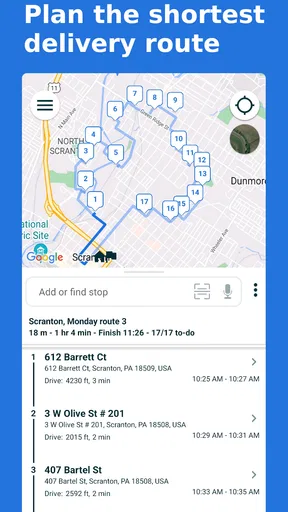
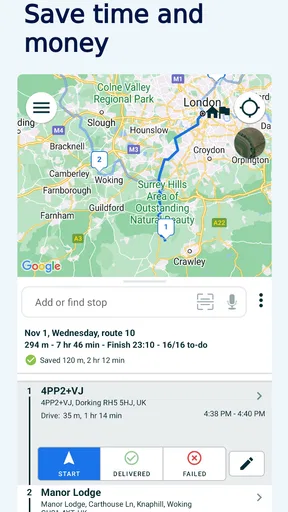
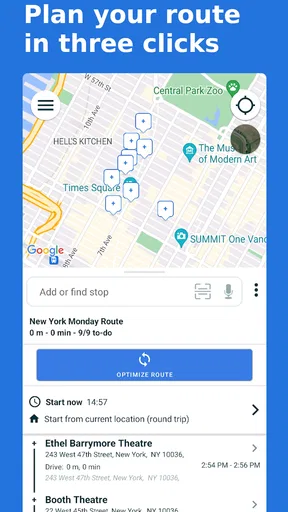

Our Review of Multi-Stop Route Planner
 Analysis by Appyee
When my day involves several destinations, I want a tool that helps me think through the whole journey rather than simply point me toward the next address. That is the practical appeal of Multi-Stop Route Planner: it is a dedicated navigation app for arranging a run of stops, and its focus is more useful than a generic map when the order and shape of the trip matter. I would consider it for delivery work, errands, and appointments across town, while remembering that a planned route is a starting point—not a promise that every real-world condition has been accounted for.
A planner for days with more than one destination
The app is developed by MapoScope - Delivery Route Optimization Experts, and it sits in the maps and navigation category. It is free to download, with in-app purchases ranging from around five dollars to about one hundred dollars per item. That makes it easy to try before deciding whether its paid options fit your routine, but I would check the purchase details in the app before committing to anything. The app is rated for everyone, and its current version is 25.12.08.01; it runs on Android 6.0 or later.
Its audience is easy to picture: someone who has a list of places to visit and wants a more deliberate plan than entering one destination at a time. That could be a courier organizing a day’s deliveries, a field worker visiting customers, or a parent combining school pickup with a pharmacy stop and grocery shopping. I would not choose it just to navigate a single familiar commute; a regular map app is usually simpler for that.
What route planning changes in practice
The real advantage of a multi-stop planner is the chance to look at the entire sequence before setting off. With ordinary turn-by-turn navigation, you may need to finish one destination, then enter the next, and only gradually notice that the overall order sends you across the same area twice. Planning multiple stops together makes that inefficiency easier to spot and gives you a route to work from instead of a string of separate trips.
For a useful result, I would first make the stop list complete, then check that every address is correct and that the labels are clear enough to recognize at a glance. A small naming habit can prevent a frustrating mistake: use a business or task name rather than a vague note such as “visit,” especially when several stops are close together. If a stop has a real deadline, I would also keep that in mind while reviewing the suggested sequence rather than assuming the shortest-looking route automatically matches the day’s priorities.
A realistic example is a delivery run with several parcels in different neighborhoods. I would gather the addresses before leaving, use recognizable labels, and inspect the proposed order while I still have time to catch a missing or mistyped destination. If a customer is only available during a certain window, that constraint should guide my decision about the sequence; route optimization can help organize distance, but it cannot make a closed door or a missed appointment convenient. This distinction is important for anyone using a planner professionally.
Using Multi-Stop Route Planner with a realistic routine
First things first, downloading the app is a breeze. It's available on both Android and iOS, so no one's left out here. Once you've got it installed, the setup is super intuitive. The app welcomes you with a clean interface, making it easy to dive right in. If you're anything like me, you appreciate when an app doesn't require a PhD to navigate.
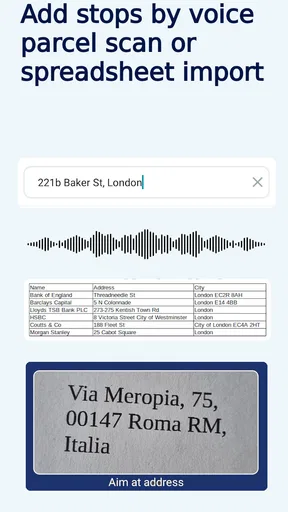
To start planning your route, you simply enter all your destinations. The app allows you to add multiple stops, and trust me, the process is as smooth as butter. You can even label each stop, which is a neat feature for those of us who tend to forget why we're headed somewhere in the first place. The app calculates the most efficient route, saving you both time and gas money. Who doesn’t love saving a few bucks?
Features that Make Life Easier
Now, let's talk about some of the standout features that make the Multi-Stop Route Planner a must-have. One of my personal favorites is the ability to optimize routes in real-time. Traffic can be a nightmare, but this app recalibrates your route based on current traffic conditions. It's like having a GPS that actually listens to your needs.
For a busy day, I find it sensible to review the route before driving rather than relying on a changing plan without looking. If a stop is optional, I can decide whether it is worth keeping before setting out; if it is essential, I can make sure it is still on the list. That simple check helps keep the plan useful when the day changes. Even a well-ordered route needs a human to make the call when a customer cancels, a shop is unexpectedly busy, or an urgent errand takes priority.
Another cool feature is the integration with your calendar. You can sync your appointments, and the app will automatically create a route for you. It's a seamless way to manage your day without having to switch between apps. Plus, it's super handy for those of us who live by our schedules.
Calendar-based planning is most valuable when appointments already define the shape of the day. I would still review the generated route instead of treating it as a complete schedule: a calendar entry can tell me where I need to be, but I may know about parking, building access, or a time buffer that is not obvious from the address alone. If your calendar is already crowded with tentative plans, checking which events should actually become stops can also prevent a route from being cluttered with places you may not visit.
The app also offers voice-guided navigation, which means you can keep your eyes on the road. Safety first, right? Plus, the voice is actually pleasant and not robotic, which is a huge plus in my book.
Where it fits—and where it may not
Compared with using a standard maps app one destination at a time, a dedicated route planner is better suited to preparing a sequence of visits and thinking about the whole trip. A general map remains the more natural choice when I need to search for a nearby place, explore an unfamiliar neighborhood, or navigate a single destination without any planning overhead. The two approaches solve different problems, so I would not replace my everyday map automatically; I would reach for this app when the list of stops is the challenge.
There is also a practical trade-off in any optimized route: the route that appears most efficient may not be the route I personally prefer. I might want to complete a time-sensitive visit first, avoid an awkward turn, or leave a flexible stop for later. Before driving, I would scan the order and adjust my expectations around the day’s fixed commitments. Route planning is most helpful when I supply good addresses and a sensible list, not when I expect software to understand every preference I have not entered.
For someone who makes repeated multi-stop trips, the app’s focus could make planning feel more manageable. A delivery driver or a mobile professional may appreciate being able to organize a route before setting off; a household running occasional errands may like the same idea on a smaller scale. By contrast, someone who only travels between home and work, or who prefers choosing every turn in a general-purpose map, may not gain enough from a separate planner to justify adding another app to the routine.
Another point I would consider is how much of the route I need to prepare in advance. If my day is predictable, entering destinations together gives me a clearer plan. If stops are being added or removed constantly, the benefit depends on whether I am willing to pause and keep the list current. I would avoid making edits while moving and instead pull over safely or revise the route before departure. That is a small workflow choice, but it matters more than a polished interface when the app is being used during a packed workday.
User Experience and Interface
Now, let’s chat about the user experience. The interface is sleek and modern, yet incredibly user-friendly. Even if you're not a tech guru, you'll find navigating through the app a walk in the park. Everything is laid out in a way that makes sense, and the app's responsiveness is top-notch.
The color scheme is easy on the eyes, and the icons are intuitive. You won't find yourself squinting or second-guessing what each button does. It's clear that the developers put a lot of thought into making this app as accessible as possible.
Ease of use matters especially when the stop list is long enough to become confusing. I would enter destinations in a calm moment, use labels that distinguish similar addresses, and check the sequence once before starting navigation. This is a more dependable habit than trying to remember which stop was meant to come next while dealing with traffic. The planner can reduce the mental load of organizing a route, but it cannot remove the need to verify the details that I typed in.
There is a learning curve of a different kind, too: knowing when to trust the suggested order and when to override it. For a straightforward set of errands, I would let the route do much of the organizing. For visits with fixed appointment times, fragile deliveries, or personal priorities, I would treat its route as a draft and use my own knowledge to decide what comes first. That balance is the difference between using route optimization as a practical aid and expecting it to make every decision for me.
The app has an average rating of 4.6 from around sixteen thousand ratings, with about one thousand one hundred written reviews, and it has been installed over one million times. Those figures suggest that many people have found a reason to try it, but popularity alone does not tell me whether its workflow suits a particular job. I would judge it by a simple test: does planning the stops together save me enough mental effort to make it part of my routine?
A useful tool when the route itself is the problem
All in all, the Multi-Stop Route Planner is a game-changer for anyone with a busy schedule. It's efficient, user-friendly, and packed with features that make everyday commuting a breeze. Whether you're running errands, on a business trip, or planning a road trip, this app is your go-to companion.
My recommendation is strongest for people who regularly visit several places in one outing and want a clearer way to organize that run. Its combination of multi-stop planning, labeled destinations, calendar integration, and guided navigation gives it a more focused role than a basic point-to-point map. I would start with an ordinary errand day, check how the planned order fits my real priorities, and only then decide whether it deserves a place in a daily work routine.
So, if you're tired of getting lost between stops or wasting time on inefficient routes, give the Multi-Stop Route Planner a shot. It's like having a travel wizard in your pocket, guiding you to every destination with ease. Happy travels, and may your journeys be smooth and swift!
Verdict
Strengths of Multi-Stop Route Planner
- Intuitive interface for easy navigation.
- Supports multiple map views and options.
- Real-time traffic updates included.
- Ability to save frequent routes.
- Syncs across multiple devices.
Limitations of Multi-Stop Route Planner
- Limited offline functionality.
- Subscription required for premium features.
- Occasional slow loading times.
- Battery drain on prolonged use.
- Limited integration with other apps.
Similar Picks in This Category
View All
Uber - Request a ride
Uber Technologies, Inc.4.7


inDrive. Rides with fair fares
® SUOL INNOVATIONS LTD4.8

Yandex Go: Taxi Food Delivery
Mikromobilnost LLC Belgrade4.8

Bolt: Request a Ride
Bolt Technology4.8

Rapido: Bike-Taxi, Auto & Cabs
Rapido Bike Taxi4.8
Frequently Asked Questions
What features does the Multi-Stop Route Planner offer?
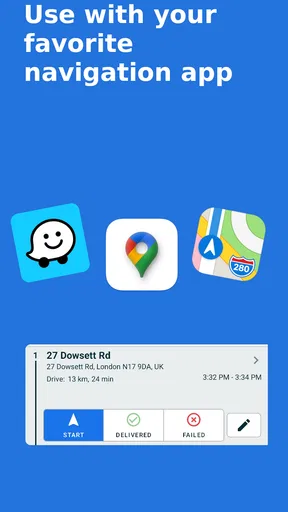
The Multi-Stop Route Planner provides a variety of features including unlimited stops, optimized routing for efficiency, real-time traffic updates, and integration with popular map services. It also offers route customization, time estimations, and the ability to save and share routes, making it ideal for delivery drivers, salespeople, and travelers.
Is the Multi-Stop Route Planner compatible with both Android and iOS devices?
Yes, the Multi-Stop Route Planner is available for both Android and iOS. This ensures that users can seamlessly access the app regardless of their device preference. It also provides regular updates to improve performance and introduce new features across both platforms.
Does the Multi-Stop Route Planner require an internet connection to function?
While the app does require an internet connection for real-time traffic updates and map services, it also allows users to save routes for offline use. This feature is particularly useful for areas with limited connectivity, ensuring continuous navigation without interruptions.
How user-friendly is the Multi-Stop Route Planner for new users?
The Multi-Stop Route Planner is designed with an intuitive interface, making it user-friendly even for those new to route planning apps. It provides easy-to-follow instructions, a clean layout, and helpful tips to guide users through the process of adding stops and optimizing their routes efficiently.
What are the main advantages and limitations of the Multi-Stop Route Planner?
The main advantages include its robust optimization algorithms, ease of use, and comprehensive features like real-time updates and offline capabilities. However, some users may find the initial setup time-consuming, and there might be occasional inaccuracies in traffic data due to reliance on third-party services.
